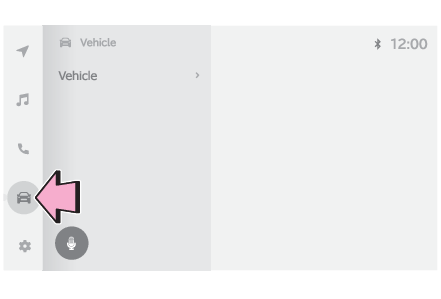
Consumption screenFuel consumption informationFuel consumption information can be displayed on the multimedia system.ConsumptionCurrent fuel consumption screenSelect
on the main menu.Select “
Trip information”.If a screen other than “
Current” is displayed, select “
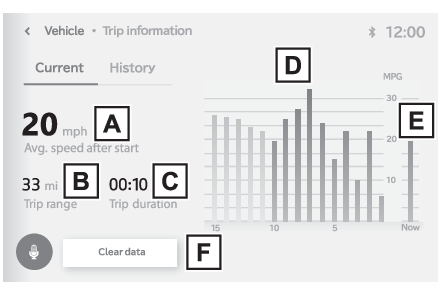
Current”.Average vehicle speed since the engine was started.Trip rangeElapsed time since the engine was started.Fuel consumption in the past 15 minutesCurrent fuel consumptionResetting the consumption dataUse the displayed average fuel consumption as a reference. The image is an example
only, and may vary slightly from actual conditions.History fuel consumption screenSelect
on the main menu.Select “
Trip information”.If a screen other than “
History” is displayed, select “
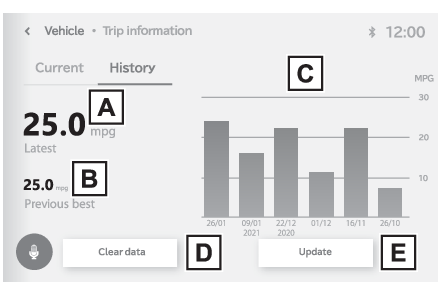
History”.Latest fuel consumptionBest recorded fuel consumptionPrevious fuel consumption recordResetting the history dataUpdating the latest fuel consumption dataUse the displayed average fuel consumption as a reference. The image is an example
only, and may vary slightly from actual conditions.Note:Updating the history dataUpdate the average fuel consumption by selecting “
Update” to measure the current fuel consumption again.Resetting the dataThe fuel consumption data can be deleted by selecting “
Clear data”.Trip rangeDisplays the estimated maximum distance that can be driven with the quantity of fuel
remaining.As a result, the actual distance that can be driven may differ from that displayed.