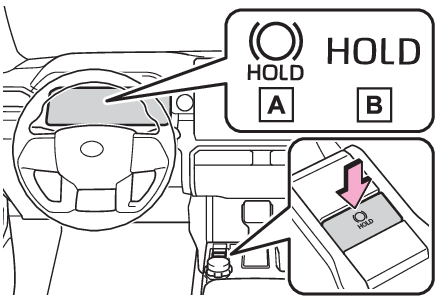
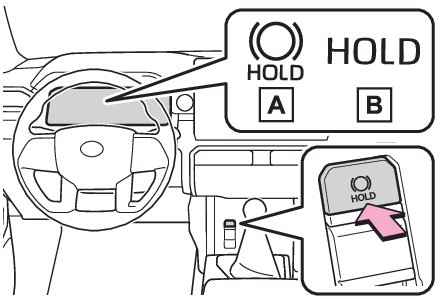
Brake holdBrake
Brake holdBrake HoldVehicles with an Automatic transmissionThe brake hold system keeps the brake applied when the shift lever is in D, S or N
with the system on and the brake pedal has been depressed to stop the vehicle. The
system releases the brake when the accelerator pedal is depressed with the shift lever
in D or S to allow smooth start off.Vehicles with a manual transmissionThe brake hold system keeps the brake applied when the shift lever is not in R with
the system on and the brake pedal has been depressed to stop the vehicle. The system
releases the brake when the accelerator pedal is depressed with the shift lever in
forward to allow smooth start off.Switches
Brake Hold switchEnabling the systemTurns the brake hold system onThe brake hold standby indicator (green)
comes on. While the system is holding the brake, the brake hold operated indicator
(yellow)
comes on.Vehicles with an Automatic transmissionVehicles with a Manual transmissionNote:Brake hold system operating conditionsThe brake hold system cannot be turned on in the following conditions:The driver’s door is not closed.The driver is not wearing the seat belt.The parking brake is engaged.If any of the conditions above are detected when the brake hold system is enabled,
the system will turn off and the brake hold standby indicator light will go off. In
addition, if any of the conditions are detected while the system is holding the brake,
a warning buzzer will sound and a message will be shown on the multi-information display.
The parking brake will then be set automatically.Brake hold functionIf the brake pedal is left released for a period of about 3 minutes after the system
has started holding the brake, the parking brake will be set automatically. In this
case, a warning buzzer sounds and a message is shown on the multi-information display.To turn the system off while the system is holding the brake, firmly depress the brake
pedal and press the button again.The brake hold function may not hold the vehicle when the vehicle is on a steep incline.
In this situation, it may be necessary for the driver to apply the brakes. A warning
buzzer will sound and the multi-information display will inform the driver of this
situation. If a warning message is shown on the multi-information display, read the
message and follow the instructions.When the parking brake is set automatically while the system is holding the brakesPerform any of the following operations to release the parking brake:Depress the accelerator pedal. (The parking brake is not released if the seat belt
is not fastened, door is open, and/or the shift lever is in P or N.)Operate the parking brake switch with the brake pedal depressed.Make sure that the parking brake indicator light goes off. (Parking brake)When an inspection at your Toyota dealer is necessaryWhen the brake hold standby indicator (green) does not illuminate even when the brake
hold switch is pressed with the brake hold system operating conditions met, the system
may be malfunctioning. Have the vehicle inspected at your Toyota dealer.If “
Brake Hold Malfunction Press Brake to Deactivate Visit Your Dealer” or “
Brake Hold Malfunction Visit Your Dealer” is displayed on the multi-information displayThe system may be malfunctioning. Have the vehicle inspected by your Toyota dealer.Warning messages and buzzersWarning messages and buzzers are used to indicate a system malfunction or to inform
the driver of the need for caution. If a warning message is shown on the multi-information
display, read the message and follow the instructions.When another control activates with the brake hold systemA message is displayed on the multi-information display in any of the following cases.“
Brake Hold Unavailable, See the Owner’s Manual”When the brake hold switch is pressed while the downhill assist control system is
activated.When the brake hold switch is pressed while the front-wheel drive control switch is
turned to “
4L” mode.“
Brake Hold Unavailable, Press Brake to Deactive.”When the “
DAC/CRAWL” switch is operated while the brake hold system is activated.When the four-wheel drive control switch is turned to “
4L” mode while the brake hold system is activated.The brake hold system and downhill assist control system or transfer “
4L” mode cannot be activated at the same time.Please press the brake hold switch with the brake pedal depressed to turn off the
brake hold system.If the brake hold operated indicator flashesBrake hold operated indicator (warning buzzer)Warning:When the vehicle is on a steep inclineTake care when using the brake hold system on a steep incline, exercise caution. The
brake hold function may not hold brakes in such situations.Also, the system may not
activate depending on the angle of the slope.When stopped on a slippery roadThe system cannot stop the vehicle when the gripping ability of the tires has been
exceeded. Do not use the system when stopped on a slippery road.Notice:When parking the vehicleThe brake hold system is not designed for use when parking the vehicle for a long
period of time. Turning the engine switch off while the system is holding the brake
may release the brake, which would cause the vehicle to move. When operating the engine
switch, depress the brake pedal, shift the shift lever to P (vehicles with an automatic
transmission) or N (vehicles with a manual transmission), and set the parking brake.