Crawl ControlSwitches
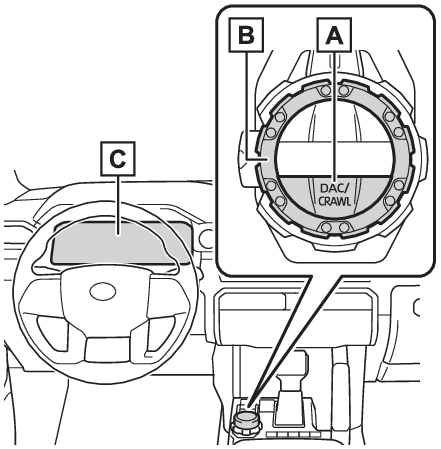
DAC/CRAWL switchSwitches
Mode select switchCrawl Control**If equippedAllows travel on extremely rough off-road surfaces at a fixed low speed without pressing
the accelerator or brake pedal. Minimizes loss of traction or vehicle slip when driving
on slippery road surfaces, allowing for stable driving.Warning:When using Crawl Control functionDo not rely solely on the Crawl Control function. This function does not extend the
vehicle’s performance limitations. Always thoroughly check the road conditions, and
drive safely.These conditions may cause the system not to operate properlyWhen driving on the following surfaces, the system may not be able to maintain a fixed
low speed, which may result in an accident:Extremely steep inclines.Extremely uneven surfaces.Snow-covered roads, or other slippery surfaces.System components“
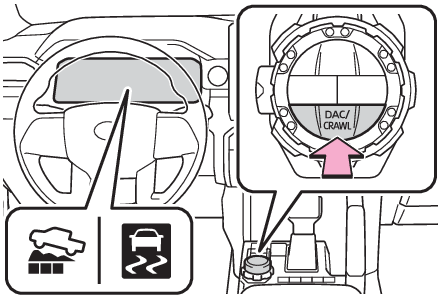
DAC/CRAWL” switchMode select switchMulti-information displayTurning Crawl Control onPress the “
DAC/CRAWL” switch.The Crawl Control indicator on the multi-information display will come on, and the
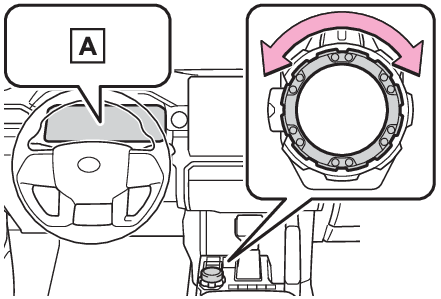
slip indicator will flash.Turn the mode select switch left or right to select a mode on the multi-information
display.Multi-information displaySelectable modesA mode which matches the road conditions can be selected from among the following
5 modes.“
LO”Suitable for driving on rocky roads or decline“
LO-Mid”Suitable for driving on rocky roads, decline or bumpy incline“
Mid”Suitable for driving on bumpy inclines“
Mid-HI”Suitable for driving on bumpy inclines, debris roads, snow-covered roads, muddy roads,
gravel roads and grass roads“
HI”Suitable for driving on bumpy inclines, debris roads, snow-covered roads, muddy roads,
gravel roads and grass roadsTurning Crawl Control offWhen the “
DAC/CRAWL” switch indicator illuminatesPress the “
DAC/CRAWL” switch again.When the “
DAC/CRAWL” switch indicator does not illuminatePress the “
DAC/CRAWL” switch to turn the indicator on. Press the “
DAC/CRAWL” switch again with the indicator turned on.If Crawl Control is turned off, the Crawl Control indicator and the slip indicator
will go off and a message, stating that Crawl Control has been turned off will be
displayed on the multi-information display for several seconds.When turning off Crawl Control while driving, drive extremely carefully.Note:Operating tipsCrawl Control can be used with Multi-terrain Select (if equipped) ON or OFF. (Multi-terrain Select*)Operation conditions of the Crawl ControlThe engine is running.The shift lever is in any gear other than P or N.The front-wheel drive control switch is in “
4L”.The driver’s door is closed.Automatic system cancelation of Crawl ControlIn the following situations, the buzzer will sound intermittently and the Crawl Control
will be canceled automatically. In this event, the Crawl Control indicator will flash
and then go off, and a message stating that Crawl Control has been turned off will
be displayed on the multi-information display for several seconds.When the shift lever is moved to P or N.When the front-wheel drive control switch is in “
4H”.When the driver’s door is opened.Function limitations of Crawl ControlOn vehicles with rear differential lock system, in the following situations, brake
control can be used to drive downhill at a constant speed. However, engine control
is not available when driving uphill at a constant speed.When the vehicle speed exceeds approximately 6 mph (10 km/h).In the following situation, engine control and brake control will stop temporarily.
In this event, the Crawl Control indicator will flash.With the rear differential is locked: when the vehicle speed exceeds approximately
6 mph (10 km/h).With the rear differential is unlocked: when the vehicle speed exceeds approximately
15 mph (25 km/h).When the Crawl Control system is operated continuouslyIf Crawl Control is used continuously for a long time, the brake system overheats.
In this case, a buzzer will sound, a message stating a malfunction will be displayed
on the multi-information display, and the Crawl Control indicator will flash and then
go off. In this event, as Crawl Control will be temporarily inoperable, stop the vehicle
immediately in a safe place, and allow the brake system to cool down sufficiently
until the message goes off. (In the meantime, normal driving is possible.)If Crawl Control is used continuously for a long time, the automatic transmission
overheats. In this case, a buzzer will sound, the system will be temporarily canceled,
and a message stating a malfunction may be displayed on the multi-information display.
In this event, stop the vehicle in a safe place until the message goes off.Sounds and vibrations caused by the Crawl Control systemA sound may be heard from the engine compartment when the engine is started or just
after the vehicle begins to move. This sound does not indicate that a malfunction
has occurred in Crawl Control system.Either of the following conditions may occur when the Crawl Control system is operating.
None of these are indicators that a malfunction has occurred.Vibrations may be felt through the vehicle body and steering.A motor sound may be heard after the vehicle comes to a stop.When there is a malfunction in the systemWarning lights and/or warning messages will turn on. (Actions to the warning lights or warning buzzers, If a warning message is displayed)