Trailer brake controllerSwitches
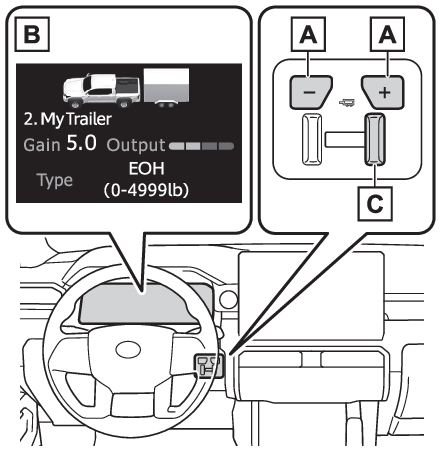
Trailer brake control switchTrailer brakeTrailer brake controller**If equippedThe trailer brakes can be controlled by the Trailer brake controller via the 7-pin
connector. By selecting the type of brakes that are being used on the trailer (electric
or electric-over-hydraulic) and setting the “
gain” for the controller, the manual brake slider is used to slow just the trailer. The
vehicle brake pedal will also slow down as well as stop the trailer when applied,
also via the same connector. “
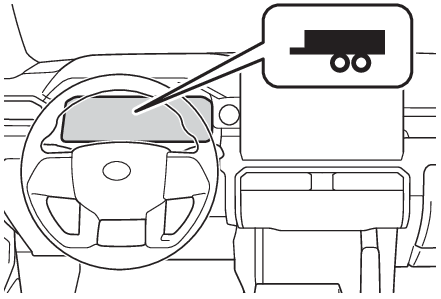
Gain” values, manual brake outputs, trailer brake types, and the trailer connection status
are displayed in the multi-information display.This vehicle comes equipped with a Toyota Genuine Trailer Brake Controller. Use of
a third-party trailer brake controller along with the Toyota Genuine Trailer Brake
Controller may have unexpected effects on the system. Toyota does not recommend the
use of a third-party brake controller with this vehicle.Warning:When driving on slippery road surfacesWhen stopping with ABS activated, output to the trailer might be reduced in order
to reduce the likelihood of trailer wheels to lock. The trailer is not equipped with
ABS. Drive safely on slippery road surfaces.System operation“
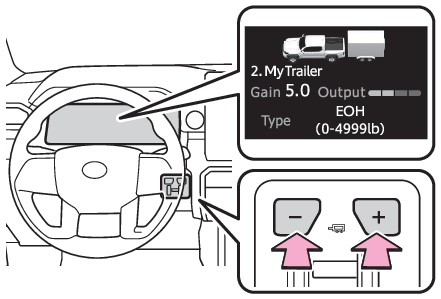
GAIN” (+/-) selection buttonPressing the “
GAIN” (+/-) buttons will adjust the amount of power that can be outputted to the trailer
brakes. The “
gain” can be adjusted from 0 (no trailer braking) to 10 (maximum output) in 0.5 increments.
Each press of the button will increase or decrease the “
gain” setting by one step. The “
gain” value will appear in the multi-information display.Trailer brake typeTrailer brake type can be selected by using the multi-information. The combination
meter will show which trailer brake type is selected in the multi-information display.Manual brake sliderAdjusting this slider position will engage the trailer’s brakes only. If the manual
brake slider is used while the vehicle brake is applied, the greater of the two outputs
will be sent to the trailer brakes.Changing settings of the trailer brake typeSelect “
Trailer Settings” on the multi-information display and add a trailer according to the display. (Multi-information display (7-inch display) - Trailer settings screen, Multi-information display (12.3-inch display) - Trailer settings screen)Changing trailer brake type or trailer ID will cause the current “
gain” setting to reset to zero. Make sure to set the “
gain” as described in the following section.Setting the “
Gain”“
Gain” setting on trailer brake controller should be set for a specific towing condition.
“
Gain” setting should be adjusted each time the vehicle load, trailer load, road conditions,
or weather changes. Setting the “
gain” value to 0 will disable the trailer brake controller output.Make sure the trailer brakes are in good working condition and functioning normally.
See trailer dealer if necessary.Hook up the trailer and make proper electrical connections.Select the correct type of trailer brakes that are equipped on the trailer by using
the multi-information display.Drive vehicle with trailer attached on a level road surface similar to towing condition
and in traffic-free environment. Driving speed should be approximately 20 - 25 mph
[35 - 40 km/h].Using the “
GAIN” (+/-) selection buttons, set a starting “
gain” of 5.0.While driving 20 - 25 mph [35 - 40 km/h], fully apply the manual brake slider.Adjust the “
gain” setting, using the “
GAIN” (+/-) selection buttons, to either increase or decrease to just below the point
of trailer wheel lock-up.For confirmation, repeat steps 6 and 7 until desired “
gain” setting is reached (just below point of trailer wheel lock-up).Note:When setting the “
gain”Wheel lock-up occurs when the trailer wheel squeals or tire smoke occurs. Trailer
wheels may not lock-up while driving heavily loaded trailer. During this case, adjust
the Trailer “
gain” to the highest allowable setting for the towing condition.When disconnecting and reconnecting battery terminalsThe “
gain” setting data will be reset.Trailer Sway Control FunctionHelps suppress trailer sway at an early stage by using the trailer brake control system
to operate the trailer brakes.If the Trailer brake warning light comes onIndicates a malfunction in the Trailer brake control system or Trailer connector circuit.Have
the vehicle inspected by your Toyota dealer immediately.Warning:Trailer brake type settingIt is the responsibility of the driver to make sure the trailer brakes are functioning
normally and adjusted appropriately. Failure to check and maintain trailer brakes
may result in loss of vehicle control, crash, or serious injury. Trailer brake control
system will work with most electric and electric-overhydraulic trailer braking systems
up to 3 axles (24A output to trailer brakes). Please be sure to test compatibility
with the system at low speeds and in a safe area. If a warning message appears in
the multi-information display (If a warning message is displayed), have the vehicle inspected by your Toyota dealer immediately. Some electric-over-hydraulic
trailer brakes will take some minimum output to activate. Trailer brake control system
will not work with trailer hydraulic surge brakes.