Trailer Backup GuideTrailer towing
Trailer Backup GuideTowing
Trailer Backup GuideTrailer Backup Guide**If equippedTrailer Backup Guide is a system to assist when backing up a trailer by providing
either (1) steering control to assist backing up straight (Straight Path Assist) or
(2) guidance for manual steering backup (Guidance mode).Trailer Backup Guide uses the rear camera to detect the trailer and a trailer hitch
light, which allows the driver to use the system at night time.The system calculates the trailer angle by image processing from the rear camera and
calculates trailer length and hitch length during the trailer setup (calibration)
maneuver.Trailer Backup Guide
ProcedureProcedureSelect “
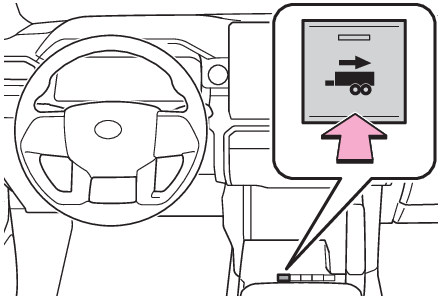
Trailer Settings” on the multi-information display and add a trailer according to the display. (Vehicle status information and indicators - Trailer settings screen, Vehicle status information and indicators - Trailer settings screen)Press the switch to turn the system ON.Continue or reselect the trailer in the message displayed on the multi-information
display.When the selected trailer is being used for the first time, setup (calibration) is
necessary (Setup (Calibration)).Once calibration is completed, it is retained for future use and the system will automatically
detect the trailer.The driver needs to change the trailer selection when using a different trailer. The
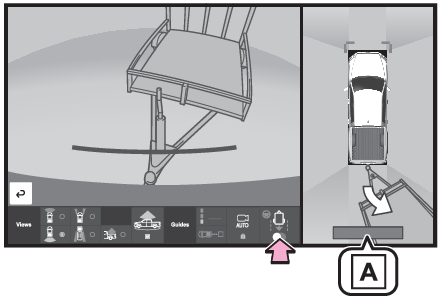
system does not automatically recognize the trailer from the saved trailers list.Once trailer is detected, shift the shift lever to R to activate Guidance mode.Touch the switch at the bottom right on multimedia to activate Straight Path Assist.“
Trailer Direction”When using Straight Path Assist, the driver can override the system using the steering
wheel to adjust the trailer direction. Upon release of the steering wheel, Straight
Path Assist re-activates with a revised straight back target direction.Note:When adding the trailerSelect “
Trailer Settings” on the multi-information display and add a trailer according to the display. (Vehicle status information and indicators - Trailer settings screen, Vehicle status information and indicators - Trailer settings screen)Trailer Settings are not available while Trailer Backup Guide system is active.The system is designed to support trailers with single or multi-axles using a ball
hitch. The system does not support fifth wheel or gooseneck trailers.Trailer Backup Guide
Setup (Calibration)Setup (Calibration)Bring the vehicle and trailer to a large open space like an empty parking lot. Activate
Trailer Backup Guide system and follow the instructions displayed on the multi-information
display/multimedia.For best calibration results, do not exceed 5 mph (8 km/h).Drive straight forward slowly (5 mph [8 km/h] or less) while holding the steering
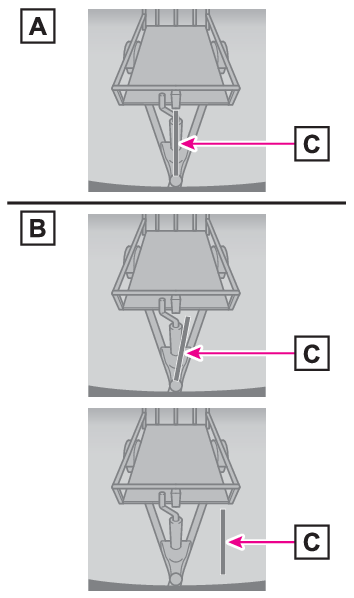
wheel straight.Stop vehicle with trailer straight and confirm blue line is aligned with trailer center
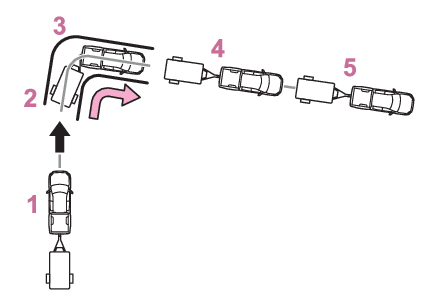
in Camera view.Drive forward slowly making a left or right turn that changes vehicle direction 90
degrees or more.After completing the turn, continue straight forward slowly to align trailer.Stop vehicle to complete calibration.Note:When calibrating the systemPlease check whether the blue line appropriately aligns with the center of the trailer
in the camera view, such as in the following diagram, with regards to procedure 2.State where the blue line aligns with the center of the trailer. (Select “
Yes” in the multi-information display)State where the blue line does not align with the center of the trailer. (Select “
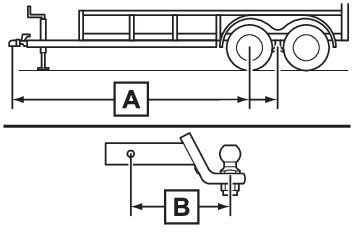
No” in the multi-information display)Blue lineThe system is designed to support most trailers 6.6 ft. (2 m) to 26.2 ft. (8 m) in
length (length is defined from the coupler center point for the ball to the wheel
axle [single axle] or center of the wheel axles [2 or more axles]) with ball mount
lengths between 4.5 in. (114.3 mm) and 18.5 in. (469.9 mm). Do not attempt to use
trailers or ball mounts that have a length outside of this range as the system performance
degrades and could cause improper system function.Trailer lengthBall mount lengthFor best calibration results, calibrate in daytime on a smooth and level road.It may be necessary at times to re-calibrate the trailer to improve performance.The system is designed to be used with the same trailer connection every time. If
the ball mount position is changed or reconfigured or items are added to the trailer
tongue after calibration, re-calibration may be required.Trailer Backup Guide
Using Guidance modeUsing Guidance modeGuidance mode provides a “
Trailer Direction” arrow that indicates the direction the trailer will swing, based on calculations
from the steering wheel angle information. Guidance mode provides a “
BRAKE Extreme Trailer Angle” (jackknife) warning with warning buzzer to alert the driver that the trailer angle
is near the jackknife condition.Trailer Backup Guide
Using Straight Path AssistUsing Straight Path AssistTouch the switch at the bottom right on multimedia to activate Straight Path Assist.
Straight Path Assist controls steering to back up the trailer in a straight-line.
The system can be overridden by using steering wheel to adjust trailer direction.The driver is always responsible for paying attention to the vehicle’s surroundings
and driving safely. This system does not control braking. Driver needs to control
vehicle speed, control braking, and stop the vehicle to avoid any collision.For best results, reverse slowly when using Straight Path Assist.Trailer Backup Guide
Canceling the systemCanceling the systemTrailer Backup Guide system is canceled when the trailer cannot be detected (e.g.
dirty camera lens, insufficient lighting condition, obstruction of the trailer in
the rear camera view, incorrectly selected trailer, etc.)Guidance mode is canceled when any of the following occurs:Press the Trailer Backup Guide switch*Press the Camera switch*Vehicle speed is greater than approximately 4.7 mph (7.6 km/h)VSC or ABS is operated*Tailgate is opened*Trailer tracking is lostShift the shift lever out of RThere is a system malfunction**Includes Trailer Backup Guide system cancelStraight Path Assist is canceled when any of the following occurs:Any of the events, above, that cancel Guidance mode occurPress the Straight Path Assist switch on the multimedia screenThe system temperature preservation function operates (to prevent power steering equipment
from overheating)Trailer Backup Guide
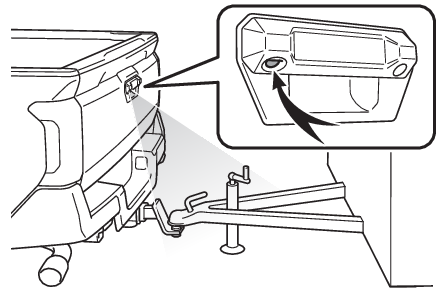
Trailer hitch lightTrailer hitch lightTrailer hitch lightThis light’s usage for Trailer Backup Guide is controlled by the Trailer Backup Guide
system and the driver does not need to activate the light separately.For other usage: Cargo lamp main switchWarning:Trailer Backup Guide
PrecautionsCautions regarding the use of the systemIn order for this system to perform as designed, the vehicle must be driven safely
and the driver must control the speed to keep it within operating parameters and to
avoid a collision.As there is a limit to the degree of control performance that this system can provide,
do not overly rely on this system. The driver is always responsible for paying attention
to the vehicle’s surroundings and driving safely. This system does not control braking
(or steering when in Guidance mode). Driver needs to control vehicle speed, control
braking, (and steering when in Guidance mode,) and stop the vehicle to avoid any collision.
Failure to follow this warning could result in property damage, serious injury or
death.When using the Trailer Backup GuideFor proper system performance, observe the following precautions. Failure to do so
may lead to an accident resulting in property damage, serious injury, or death.Keep the tailgate fully latched.Keep the rear camera clean at all times.Do not change the installation position or direction of the rear camera or remove
it.Do not modify the trailer hitch light. (Trailer hitch light)Make sure nothing can obstruct the rear camera view of the trailer.The system is designed to operate in various weather and lighting conditions and on
different ground surfaces (asphalt, grass, gravel, etc.), however performance can
still be affected by various environmental factors (e.g. shadow passing over the trailer
or diminished contrast between trailer and the ground leading to trailer detection
being lost, etc.) so always drive carefully, remain alert and aware of your surroundings,
and do not overly rely on the system.