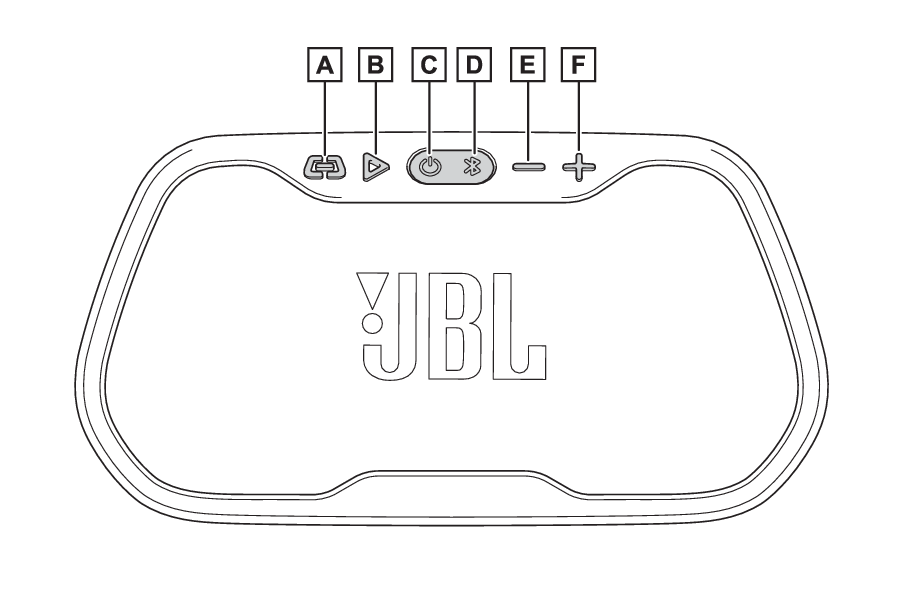
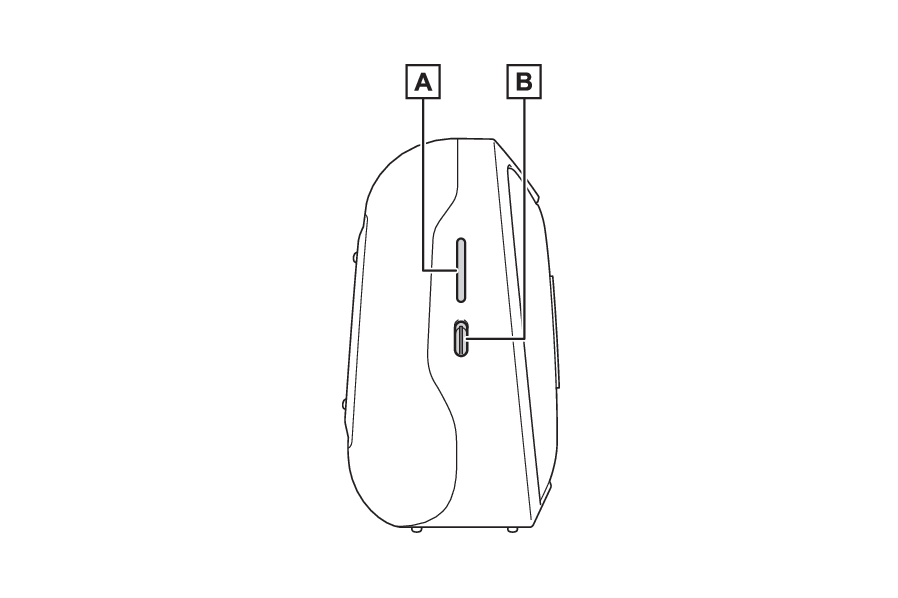
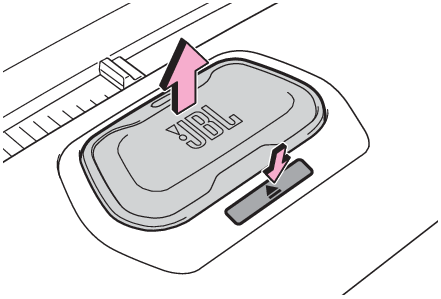
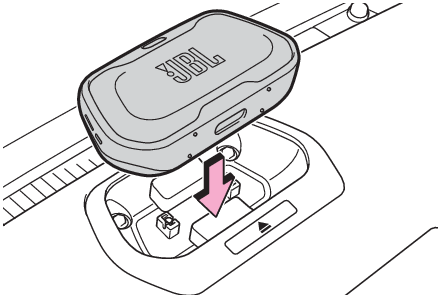
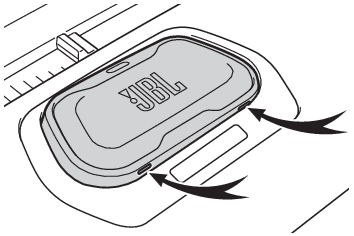
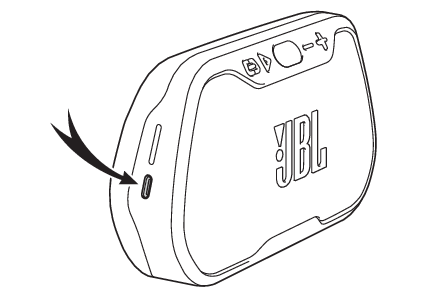
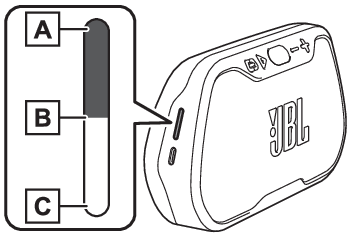
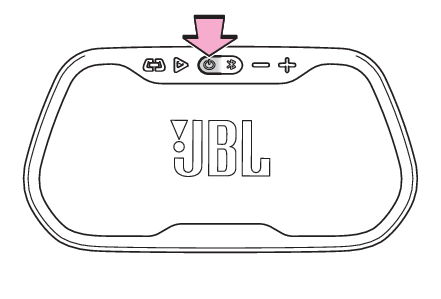
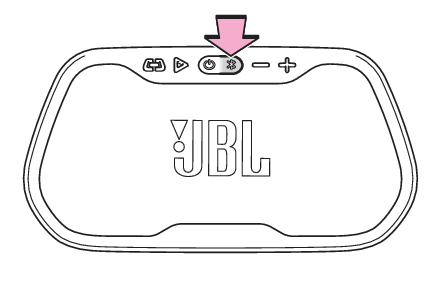
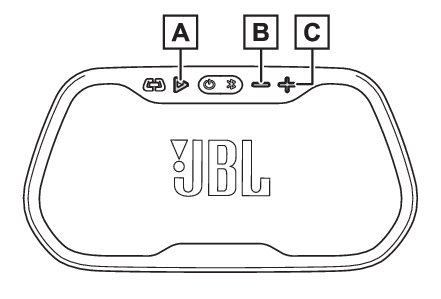
Removable speaker* *If equipped Music can be played by removing the speaker (JBL Flex) installed in the instrument panel and taking it to any desired location, and connecting it with your Bluetooth® compatible device via Bluetooth®. When attached to the dock of the instrument panel, it functions as a normal car speaker. Bluetooth® is a registered trademark of Bluetooth SIG, Inc. Warning: When driving the vehicle Install or properly secure the speaker before driving. Failure to do so could lead to an accident, serious injury or death. Components Front Link button Play/pause button Power button Bluetooth® button Volume down button Volume up button Side Battery status indicator Charging port (USB Type-C) Notice: Waterproof Performance The speaker (JBL Flex) has specifications equivalent to the waterproof standard IPX7. Even if it is temporarily (30 minutes) submerged in water up to depths of 3 ft. (1 m), it is a waterproof type that does not allow water to enter inside. Do not use the product underwater as it is not completely waterproof. If water gets into the product, stop using it and consult your Toyota dealer. Please note that the warranty does not apply to malfunctions caused by water immersion caused by mishandling by the customer. Attaching and removing the speaker (JBL Flex) Removal Press the eject button and remove the speaker (JBL Flex) from the dock. Install Push in until a click is heard. Note: Installation If the orange mark can be seen, the speaker (JBL Flex) is not fully seated. Push it in firmly until it clicks. Charging method Charge by connecting to the dock on the instrument panel. Maximum charging time: about 3.5 hours Charging with the USB-C port on the side of the main unit. When fully charged, the battery status indicator will turn solid white. Note: Remaining battery power The remaining amount of battery power can be checked with the indicator on the side of the main unit. The speaker can be used for up to 6.5 hours at 50% volume from a fully charged state. When the battery power drops to approximately 15% during playback, the bottom LED will flash red. The battery life will change over time depending on the usage, battery charge cycles, and usage environment. 100% 50% 20% How to use Connect Turn on the Bluetooth® function of the Bluetooth® device to be registered. Remove the speaker (JBL Flex) from the instrument panel dock. Press the power button to turn on the power. A startup sound is played and the power button lights up. For the last connected Bluetooth® device Bluetooth® button flashes and automatically connects. For Bluetooth® devices connected before last or connecting for the first time Press the Bluetooth® button to enter pairing mode. The Bluetooth® button on the front of the speaker (JBL Flex) flashes and a search tone sounds. Search for Bluetooth® devices on the device to be connected, and select “ TOYOTA JBL Flex”. When connected, the Bluetooth® button lights up and a connection tone is heard. How to play Once: play/pauseTwice: fast forward Volume down Volume up Disconnect Turn off the Bluetooth® function of the connected mobile phone/portable device. Alternatively, cancel the connection registration on the connected mobile phone/portable device. Turning off the power Press power button. A power down sound is played and the power button turns off. Note: Pairing The speaker (JBL Flex) will stop pairing if no device is connected in pairing mode for 3 minutes. Press the Bluetooth® button to pair again. Automatic power off It will automatically power off after 30 minutes of inactivity. Using multiple speakers (JBL Flex) JBL Link function allows connection with multiple speakers (JBL Flex) Connect Connect a Bluetooth® device to the main speaker (JBL Flex). Turn on the power of all speakers (JBL Flex) to be used. Press the link button of the main speaker (JBL Flex). A search sound is played. Press the link button on the speaker to be connected (JBL Flex). The Bluetooth® button on the speaker (JBL Flex) will blink, and when the connection is complete, only the main speaker will turn on, and the connected speaker will turn off. Disconnect Pressing the power button, Bluetooth® button, link button or attaching the speaker (JBL Flex) to the dock will unpair it. Note: Maximum number of simultaneous connections You can connect up to 100 speakers (JBL Flex). Products able to be connected Only JBL Flex can be connected. Other JBL products cannot be connected. Volume during JBL Link When pairing has succeeded, all paired speakers will have the same volume. If the volume is changed from connected Bluetooth® device or the main JBL Flex speaker, the volume of all speaker will remain in sync. If the volume is changed on a connected speaker, the speaker will lose sync with the main speaker (JBL Flex) or connected Bluetooth® device. To re-sync the speakers, the devices must be paired again. About the lighting pattern of the light
Button Pattern Status
Bluetooth® button White (Flashes) Bluetooth® pairing mode
White (Illuminates) Any Bluetooth® device connected
Off Power off
Not paired, disconnection, link loss
Power button White (Illuminates) Power on
Off Power off
Troubleshooting
Cause Solution
The power does not turn on even when the power button is pressed. Make sure the device is charged.
The power turns on, but there is no sound. Make sure it is paired.
Press the volume button (+) on the unit to raise the volume and check.
Check if playback on the audio device is paused.
Sound is distorted. If the volume is too high, lower the volume on your device.
Pairing cannot be done. Check if your device is compatible with this unit.
Check if you are connected to another device. This unit remembers the information of the device with which it has been paired once. If it is desired to play music by reconnecting to the desired device, turn off all nearby paired Bluetooth® devices, and then turn the unit off and on again.
Initializing the speaker (JBL Flex) Follow the steps below to restore the factory settings. Turn on the power of the speaker (JBL Flex). Press and hold the volume up button and play button at the same time for 3 seconds or more. A power off sound will be heard, and when the power turns off, initialization is complete. Specifications Non-Hazardous Automotive Speaker
Bluetooth® version 5.2
Transmission distance 1181.1 in. (30 m)
Bluetooth® profile A2DP V1.3.2, AVRCP V1.6.2
Rated output power Docked mode:24Wpk Standalone player mode:2 8Wpk
Transducer 0.07 1.4 in. (2 36 mm)
Frequency response Docked mode:180Hz - 19kHz (+/-1dB) Standalone player mode:70Hz - 20kHz (+/- 1dB)
Battery type Lithium Ceramic Solid-State Battery (SSB)
Charge time 3.5 hours
Music play time Up to 10 hours(Varies by volume level & audio content)
Dimensions (Width Height Depth) 7.3 3.7 2.0 in. (186 96 53 mm)
Weight 1.3 lb. (590 g)
Ingress protection rating IPX7